How to Add Your Brand to the Header of Your Video Clips
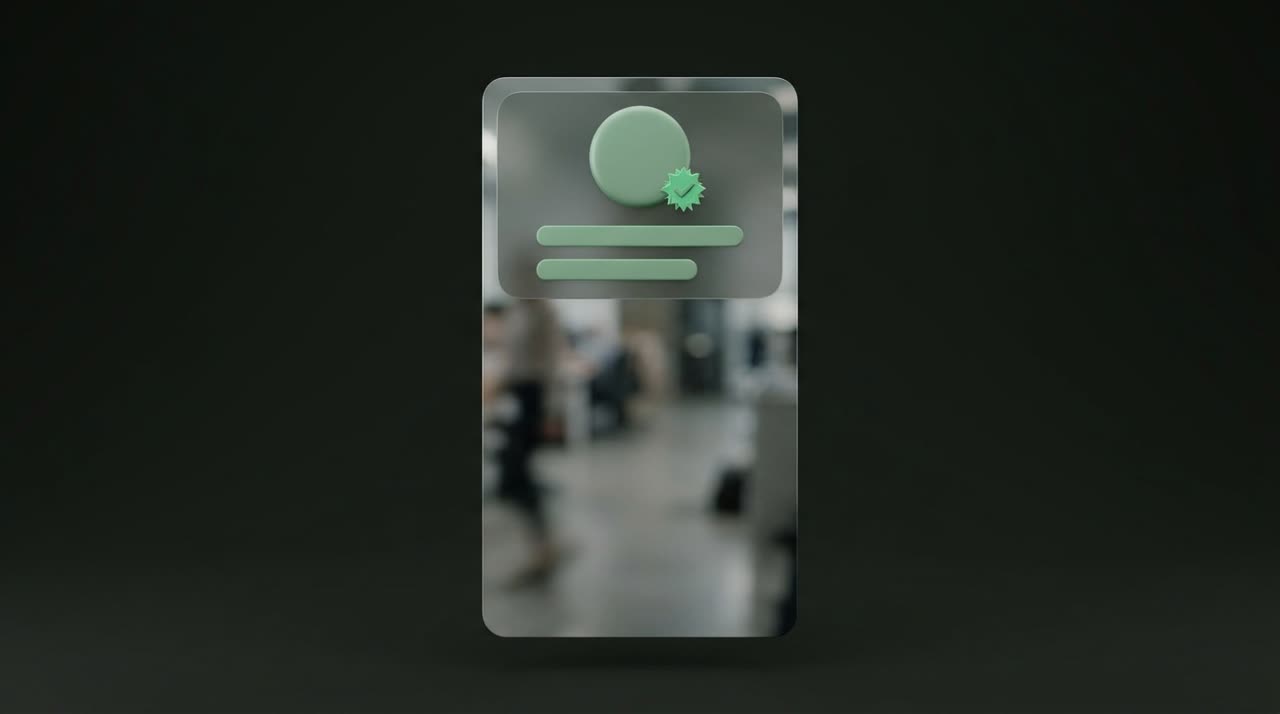
A floating header with avatar, name, @handle, and verified badge standardizes your feed and makes your clips look like a real brand.
Post Theme on Video Clips: Putting Your Brand in the Right Spot
When someone scrolls through TikTok or Reels, what makes them stop isn’t just the hook—it’s recognizing who the clip is from before even reading the caption. That’s where Picotta’s post theme on video clips comes in—a floating header with your avatar, name, @handle, and verified badge layered over the video. Instead of a loose clip, you deliver a post that already feels like a brand.
In this guide, I’ll explain what the post theme is, how it works in the clip studio, and how to use it to give your feed a consistent look, clip after clip.
What Is the Post Theme?
The theme is a rounded floating card that sits at the top of the clip, over the video. It brings your identity together in a subtle block:
- Round avatar on the left (your brand’s logo);
- Display name;
- Verified badge next to the name, if you want;
- @handle right below.
The video still shows fully behind the card—no black bars covering the scene. You can choose between two styles:
| Style | When to Use |
|---|---|
| post-dark | Semi-transparent dark background. Works with almost anything, especially bright scenes. |
| post-light | Semi-transparent light background. Good for dark videos, adds contrast. |
You can also leave the clip without a theme (none) when the moment calls for a clean video. The choice is yours, clip by clip.
Where Your Identity Comes From
All header content comes from your brand registered in Minha marca. There you set your display name, @handle, whether to show the verified badge, and upload your logo. This logo can be an image or generated from text directly in the app as a PNG—handy if you don’t have a logo yet.
A time-saver detail: Picotta allows multiple brands on the same account (number depends on your plan). Social media managers and agencies use this to keep a profile per client and switch identities with one click when generating clips—check out our guide on clips for social media and agencies.
Why Standardizing the Header Matters
The benefit of the post theme isn’t just decoration. It’s brand consistency, and it works for you:
- Instant recognition. Anyone who’s seen your clip identifies the next one before reading anything.
- Cohesive feed. A grid of posts with the same header looks professional, not thrown together.
- Authority. Name, @handle, and badge in the same spot always give the feel of an established channel.
- Attribution. If the clip gets shared (reposts, screenshots, stories), your brand travels with it.
This ties directly to what we covered in how to make viral clips: the hook grabs attention in the first seconds, but repeated identity builds an audience over time.
How It Works in Practice
In the clip studio, next to the theme selector, you have a live mockup showing exactly how the clip will look—caption in the chosen style, header with your brand, and all elements positioned. What you see is what gets rendered.
The workflow is straightforward:
- Register your brand in Minha marca (logo, name, @handle, badge).
- In the editor, choose the theme (post-dark, post-light, or none).
- Position the header—top, middle, or bottom, depending on the video framing.
- Generate. The header is rendered as a separate element over the clip, with genuinely rounded corners.
Fine-Tuning Without Using Credits
Generated a clip and want to tweak it? The Studio editor lets you reposition the theme header and change details without consuming credits—re-rendering only updates the overlays, not the whole video. You can fine-tune each clip until your feed looks just right.
The Theme Works with the Rest of the Studio
The header doesn’t work alone. It comes with features that make the clip feel hand-edited:
- Face reframe—the 9:16 framing follows whoever is speaking, instead of a fixed center cut.
- Dry cuts—pauses and silences are removed, keeping the clip’s pace.
- Automatic captions in various styles, highlighting the hook.
- Themes layered on top of all this, completing the identity.
The result is a clip without that "AI-generated" look: no excessive glow, no generic templates. Just your video, with your brand in the right place.
How Picotta Compares
Tools like OpusClip and Cut.Pro also apply brand overlays and do it well—I won’t pretend otherwise. Where Picotta stands out for creators in Brazil:
- Pricing and payment in Brazilian Real, by card—no dollar conversion, no surprises on your bill.
- Live monitor that cuts the stream as soon as it ends, already with your header applied.
- Face reframe and dry cuts enabled by default in recommended presets.
- Look without that AI feel, from the app to the final clip.
If you’re weighing options, check out the comparison of the best AI clip generators and Cut.Pro vs Picotta, which honestly detail each one.
Tips from Users
- Choose the style based on the video background, not a fixed preference: post-light for dark scenes, post-dark for the rest.
- Standardize the header position on your channel—always top, for example—to keep the grid uniform.
- Use the badge wisely. It reinforces authority; keep it on if it fits your brand.
- One brand per client if you serve multiple—Picotta supports this and speeds up scaled production. Streamers, podcasters, and churches find ready setups on the pages for streamers, podcasters, and churches.
Conclusion
The post theme on video clips is the detail that turns loose clips into a recognizable channel: avatar, name, @handle, and badge in the header, applied consistently. Combined with face reframe, dry cuts, and captions, it delivers a post ready to publish—with your brand from the first second.
Want to see your feed with a consistent look? Start clipping now and set up your brand in the studio. You can try it for free—also check out our plans and pricing and the blog for more clipping tips.
Pronto pra picotar o seu próximo vídeo?
Cole o link e receba cortes prontos pra postar. Grátis pra testar.
Comece a picotar →Sem cartão de crédito. Cancele quando quiser.